DAAIT pre-translates for you
Every segment arrives translated by DAAIT, Pangeanic's translation AI, which uses your memories, glossaries and instructions while it translates. No engine training, no waiting weeks.
 PECATPost-Editing CAT
PECAT comes with DAAIT, Pangeanic's adaptive translation, and MTQE, its quality estimator, built in: every segment arrives pre-translated with your memories and glossaries and with a quality score, so you only review what needs it.
The same Pangeanic translation technology used by EFE news agency and the Spanish Tax Agency.
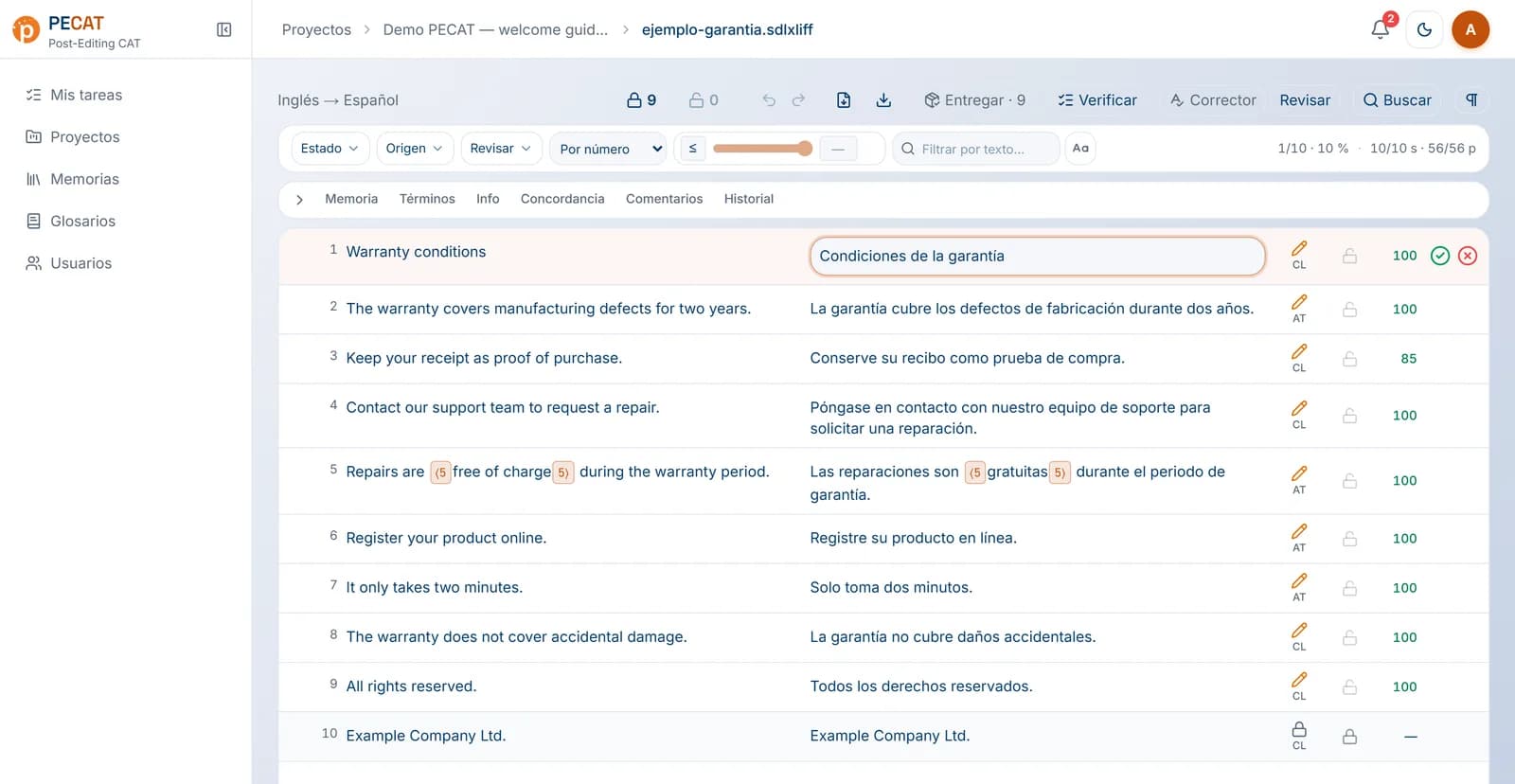
Every segment arrives translated by DAAIT, Pangeanic's translation AI, which uses your memories, glossaries and instructions while it translates. No engine training, no waiting weeks.
MTQE, Pangeanic's quality estimator, scores every segment. Review the doubtful ones first and stop re-reading what is already fine.
As you type, PECAT scores your version and DAAIT suggests an improvement. You decide whether to apply it.
Ctrl+Enter to confirm, Ctrl+Insert to copy the source, F8 to verify… with protected tags, find and replace, comments and propagated repetitions.
English → Spanish, French → Spanish… every pair you need in a single project, each with its own formality, domain, instructions, memories and glossaries.
Word, Excel, PowerPoint, PDF, XLIFF and SDLXLIFF. The translated file keeps its format.
With its language pairs and, for each one, formality, domain and instructions.
With your memories and glossaries, keeping the original's tags.
Every segment with its score, so you review first what needs it.
With your usual shortcuts and the AI by your side.
DAAIT (Deep Adaptive AI Translation) does not translate blindly: it retrieves what matters for each sentence from your memories, glossaries and documents, translates with it and refines it with AI post-editing. It is Pangeanic's technology behind projects such as EFE news agency, which went from about 400 to more than 2,000 news items a day.
Evaluator preference for DAAIT's adaptive post-editing over conventional machine translation. Pangeanic evaluation, August 2024.
MTQE (Machine Translation Quality Estimation) reads the source and the translation and gives a 0–100 score with no reference translation needed. In PECAT it scores every segment at pre-translation and scores your version again while you edit, taking your memories into account. You know what to review first and how much work is left.
PECAT (Post-Editing CAT) is Pangeanic's post-editing CAT tool: a web environment to translate and review projects with memories and glossaries, with DAAIT and MTQE, Pangeanic's own technology, built in.
Deep Adaptive AI Translation, Pangeanic's AI translation technology. It adapts to your terminology and style with your own memories and glossaries, without retraining engines.
Machine Translation Quality Estimation, Pangeanic's quality estimator. It gives every translation a 0–100 score by comparing source and target, with no reference translation, and takes your memories into account. In PECAT it scores every segment and also your version while you type.
No. PECAT has them built in: DAAIT pre-translation and MTQE scores are part of the tool.
No. PECAT uses the keyboard shortcuts of the most widespread CAT tools: Ctrl+Enter to confirm, Ctrl+Insert to copy the source, F8 to verify and the rest you already know. F1 shows them all.
Office documents (Word, Excel, PowerPoint), PDF and bilingual XLIFF and SDLXLIFF files.
Every segment has an MTQE quality score. Filter the low ones and start there; high-scoring segments can usually be confirmed as they are.
We show you PECAT with one of your projects, your memories and your glossaries.